

01.
 1159
1159
Optimizing a site for PC and mobile devices according to Google pagespeed is one of the most important factors for evaluating and seo promotion of a resource in search engines . Today we will provide recommendations for optimizing a wordpress site for Google pagespeed.
Google pagespeed website optimization
It is impossible to optimize the site once and for all!
This is a big misconception that some site owners fall into. Let's start with the fact that the requirements for website optimization change, if not every month, then once a quarter, steadily. And the site has to be adapted to the innovations.
In addition, there are different opinions on the evaluation indicators for the mobile version of the site. The indicator may change during a reboot within 5-10 minutes.
Wordpress optimization for Google pagespeed
Let's talk about the most popular platform in Runet – wordpress. Despite its popularity and seemingly constant updates, this platform already has problems with google pagespeed indicators during the basic installation.
This problem only exists because the Wordpress CMS is being misused. What does this mean, read in our article: «Framework or freeshard».
Despite the fact that WordPress is just a cms for blogs. Craftsmen have already managed to spawn online stores, exchanges, and so on on this "miracle" CMS. Thus, more than 80% of sites use this particular platform and, of course, they have optimization problems.
Google pagespeed site recommendations
Let's take a look at the recommendations from Google pagespeed:
- Remove css and js connection from <header>. This will allow you to give information to the user from the site much faster.
- Image optimization
- Server response speed
- Using modern image formats
It would seem that everything is aimed at ease of use, but that was not the case, my dears. The problems are already in the first paragraph of the recommendations.
Given that most modern sites are media content wrapped in sliders and animations. For the correct loading of content that uses sliders or animations, js is needed, and if we remove it from the header, the first thing the user will see will be text content, and only then the sliders will start loading. Unpleasant right?
Of course, for most people, the speed of the Internet will allow not to notice this bug. But you need to take care of absolutely all site visitors and not overburden their Internet.
How to optimize a website for google pagespeed?
- Remove all scripts in the footer
The result of google pagespeed is important for search engine optimization, so it should be understood that these are just guidelines. But in order to minimize the loading of the site, you still have to partially fulfill them. To begin with, leave the connection of the jquery library in the header of the site, and re-enable all other scripts in the footer. To do this, you need to create a function in your theme's functions.php.

After this action, it is imperative to check for the correct operation of the site (by dropping the cache before that if it is enabled).
- Passing all scripts through Minify (often it is possible to do this through the hosting panel)
- We also compress all style files.
Points 2 and 3 can also be done through the plugin, which I will talk about later.
We optimize media content for these purposes. We usually use the EBWW Image Optimize
plugin

This plugin allows you to batch optimize all media files of the wordpress library even with the free version.
- After we have solved the main problem in the form of media files. We need to clear the cache again and look at the quality of the images and, if necessary, unload images that were too compressed. This happens if you use sliders for the entire width of the browser.
- Next, we need two plugins: Autoptimize and WP Super Cache
Here are their settings we recommend:


WP Super Cache be sure to collect "Shared Cache" and set it to be cleared on changes.
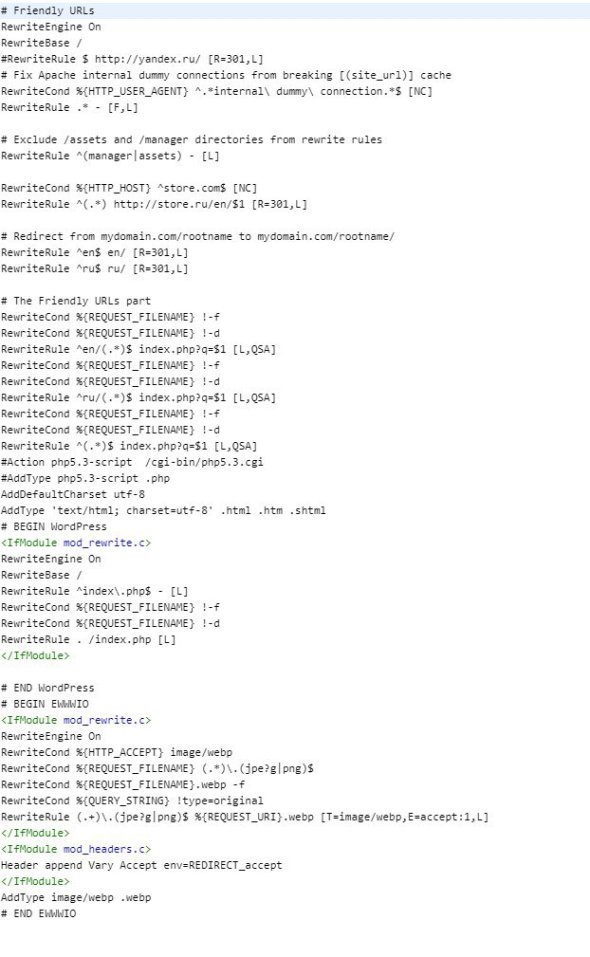
- Cache creation must be enabled on the client side of the browser. We will show on the example of Apache, that is, the settings of the .htaccess file.
Here is an example of our server presets using the .htaccess file.
These settings are a recommendation and may not work or work correctly in your case. Therefore, be sure to copy the default file and in case of errors 500 and so on, re-upload it.
This is where all our recommendations end. Thanks to these actions, we were able to achieve 100% results in gmetrix. As for the results of google pagespeed, see for yourself

And please don't forget about the main recommendation: don't overload the page with media content! This will allow you to save this result permanently. Also, if you have a task to optimize your site for google pagespeed and it doesn't work out for you. You can always contact us!

Last News

Cloud Technologies in Web Development: New Opportunities in 2025

Content Personalization Through AI: Trends for 2025


Overview of Popular CMS for Websites in 2025


Send comment